
Zum Inhalt springen
View in the app

A better way to browse. Learn more.

Lovetoytest Erotikforum

A full-screen app on your home screen with push notifications, badges and more.

To install this app on iOS and iPadOS
  1. Tap the Share icon in Safari
  2. Scroll the menu and tap Add to Home Screen.
  3. Tap Add in the top-right corner.
To install this app on Android
  1. Tap the 3-dot menu (⋮) in the top-right corner of the browser.
  2. Tap Add to Home screen or Install app.
  3. Confirm by tapping Install.

gotnoname

Members
  • Benutzer seit

  • Letzter Besuch

Alle erstellten Inhalte von gotnoname

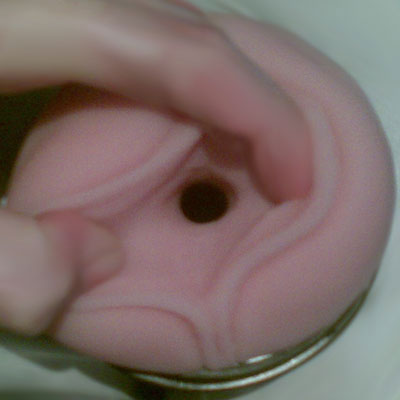
  1. Hmm - danke für Deine Antwort. Na wenn es da so eine eindeutig zu messende Stelle gäb Die ersten gut 10cm sind ungefähr so eng wie auf dem Foto zu sehen. Das andere Ende des Inserts ist gefühlt etwas weiter, aber das Ende des Inserts liegt ja auch quasi "lose" im Gehäuse. *ratlos*
  2. Hi, ich wollte gerne das "weiteste" Standard Insert haben und habe nun die Befürchtung, dass mir zum zweiten Mal ein falsches Insert geliefert wurde. (Diesmal SuperTight anstatt Standard, davor wurde mir ein SpeedBump geliefert) Ich habe ein Foto angehangen. Kann mir einer von Euch sagen, ob es sich auf dem Foto um das SuperTight oder Original Insert handelt? Vielen Dank! Gruß
Account

Navigation

Suche

Suche

Configure browser push notifications

Chrome (Android)
  1. Tap the lock icon next to the address bar.
  2. Tap Permissions → Notifications.
  3. Adjust your preference.
Chrome (Desktop)
  1. Click the padlock icon in the address bar.
  2. Select Site settings.
  3. Find Notifications and adjust your preference.
