Penispower
Members
-
Benutzer seit
-
Letzter Besuch
Alle erstellten Inhalte von Penispower
-
fullpower Dein Kommentar hättest du Dir auch Sparen können
-
Wieviel Watt sollten die Pc Aktivboxen haben? Danke für jede Antwort
-
350euros kannste für hinlegen. Müßtest du auch leicht finden wenn Du aufmerksam im Netz schaust
-
Stereobetrieb? Klär und doch mal auf Druide Was hat es auf sich mit Stereo bzw der unterschied`?
-
Wer hat Icq und könnte Mir Estim Sounds rüberschicken? Bitte melden Danke
-
tja die Männer müssen zahlen habe mich grade angemeldet.ich Sollte auch zahlen. Nein Danke http://www.picland.to/ da kostet nichts
-
Also ich hatte mal das Poppers SNIPER. Gekauft in einen Sexshop auf der reeperbahn, habe dran geschnüffelt und nichts als die derbsten Kopfschmerzen bekommen. Eine Art Druck im Kopf gespürt und danach habe ich das niewieder angerührt was habe ich falsch gemacht?
-
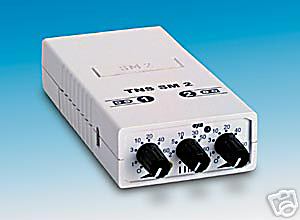
Frage an alle Reizstromkenner Wie steht es mit diesem Gerät? Was kann man damit machen? Lohnt sich die Anschaffung? technische Daten des TENS SM 2 Gerätes: Ausgangsleistung 2 mal 70 mA bei Belastung an 1000 Ohm Impulsbreite 0,2 msec Frequenzbereich 1 - 100 Hertz Impusform positives Rechteck mit negativer Nachschwankung Stromversorgung 9 Volt Batterie
-
Wie kann man bei smartstim töne runterladen? Und mit welchem Programm muss man sie abspielen? Würde mich sehr über Antworten Freuen, @ Newton schick mir mal die Baupläne bitte